Modules

15 modules working on one shared set of data. Choose only what you need.

Each module works on its own, so every organisation chooses only what it needs. Used together they pass data to each other: procurement receipts become warehouse income, piecework pay goes into payroll, and every transaction is posted to the general ledger. All modules are in Mongolian, English, Chinese, Russian and Korean; every module can be tried free for 30 days. The work board, chat, mail, correspondence, contracts, profiles, structure, attendance and the lessor portal are the base and always open.

See example bundles ↓

Prime AI

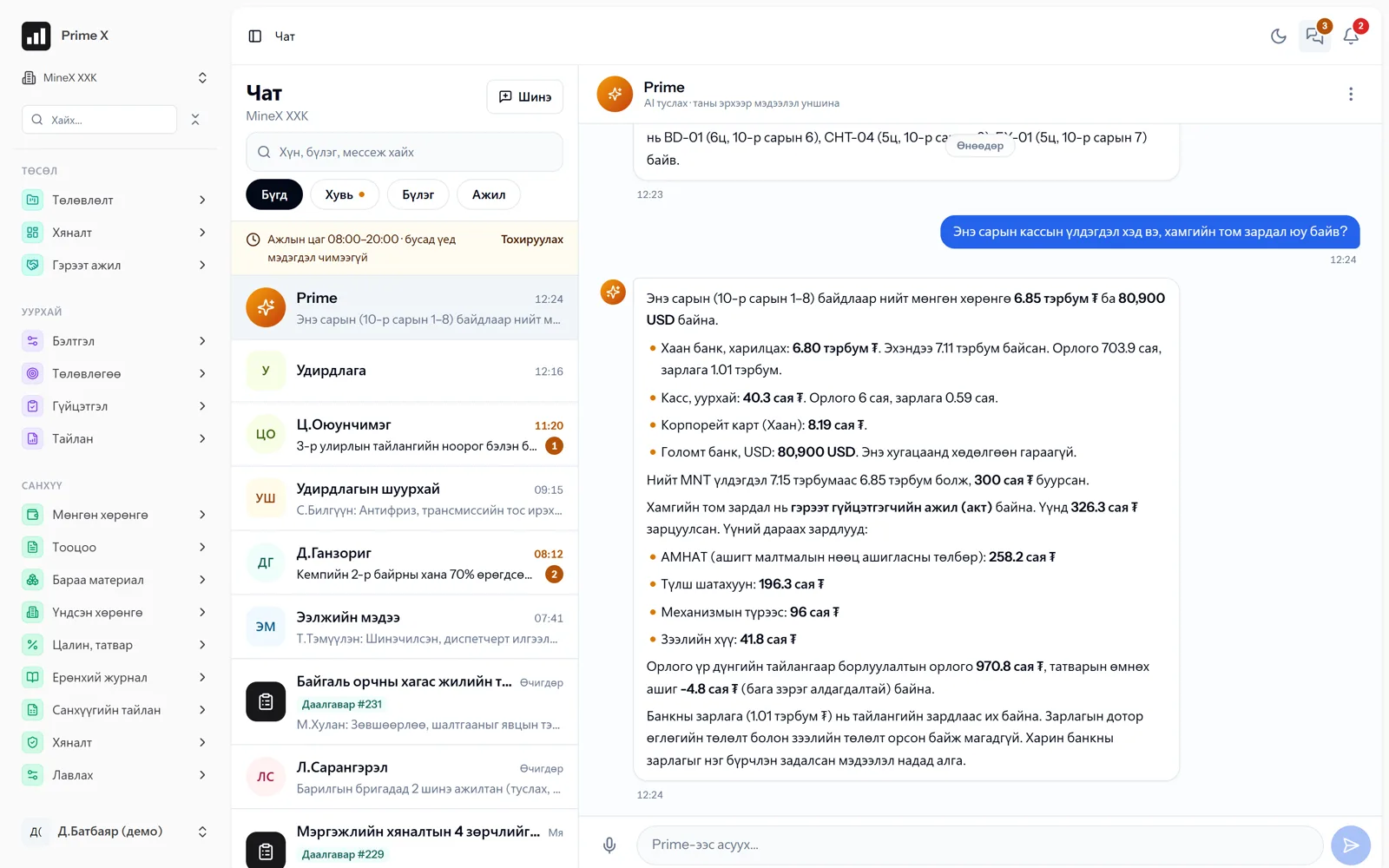
An AI assistant you ask by voice — on your own numbers

Type your question, or press the microphone and say it in Mongolian, and get an answer counted from the system’s records right away.

Prime is the AI assistant that works inside PrimeX. It reads only the data the user is entitled to and answers questions about trips, idle time, repairs, cash, bank, expenses, receivables, payables, warehouse stock, attendance, productivity and tasks. Because answers come from the system’s numbers they are specific, such as “Khan Bank balance ₮6,987,178,857”. Topics it could not answer are logged and the system improves.

  • Trip, idle-time and repair analysis
  • Cash, bank, expenses, receivables, payables
  • Warehouse stock, procurement requests
  • Attendance, productivity, tasks
  • Ask by voice — speech is turned into text, counted and answered
  • Only authorised data, usage control
Details and more screens →
PrimeX · Prime AI assistant
Prime AI assistant
Demo company screen · sample data

Chat

Work chat, notifications

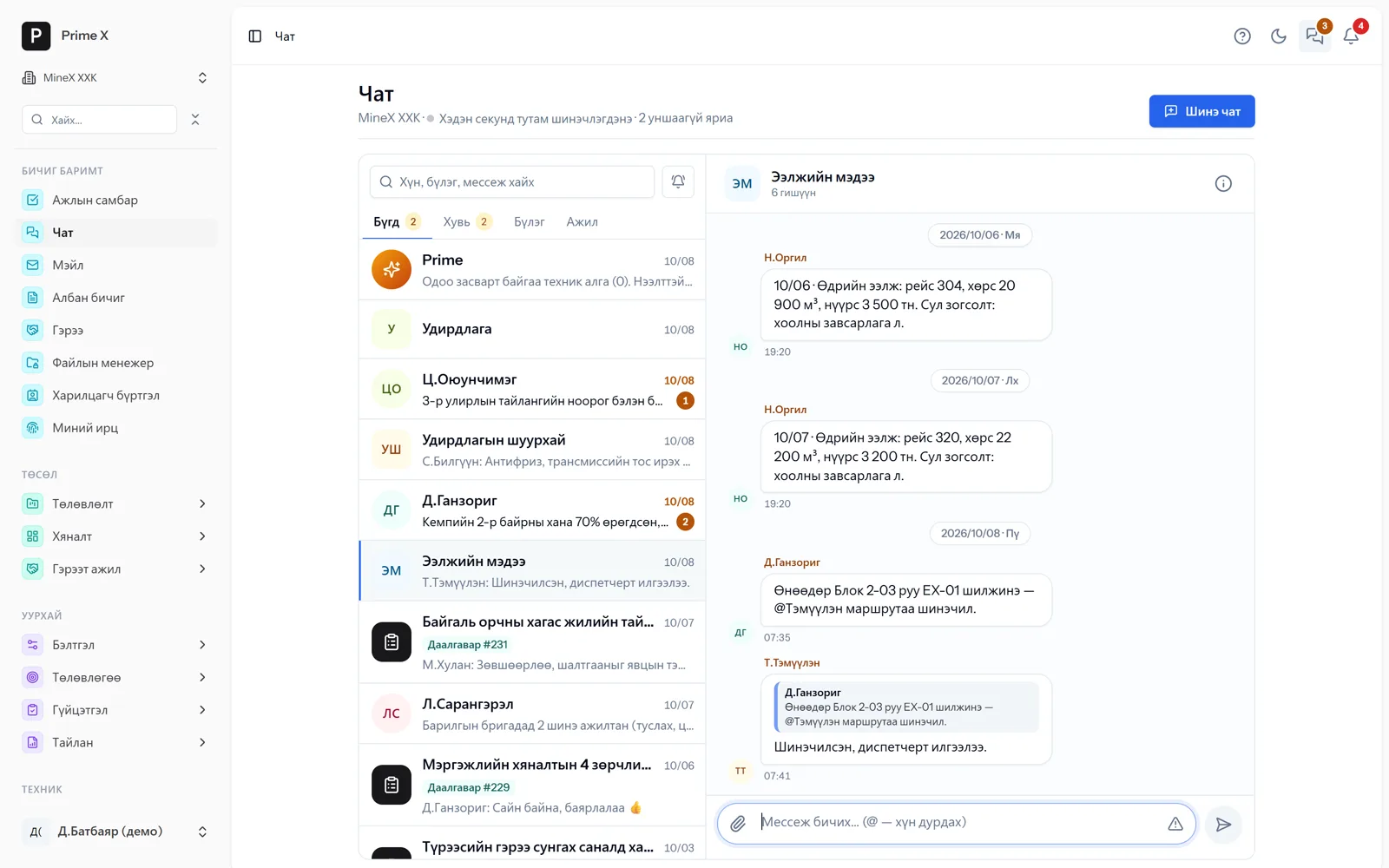
A chat for every person, group, department, task and waybill. Work information stays inside the work system.

Private and group chats, a chat for every department automatically. Every task has its own chat — progress notes join the conversation. Every waybill (machine × day × shift) has its own chat, so the dispatcher, driver and mechanic talk in one place. Urgent messages, @mentions, file attachments, read receipts, encryption. Notifications are silent outside working hours. Every notification in one centre, on the phone via Telegram and Web Push.

  • Private, group and department chats — in real time
  • Task chats, waybill chats
  • Urgent messages, @mentions, files
  • Encryption, read receipts
  • Working-hours settings
  • Notification centre, Telegram, Web Push
Details and more screens →
PrimeX · Group conversation
Group conversation
Demo company screen · sample data

Projects

PMBOK / ISO 21502 — at the level of P6

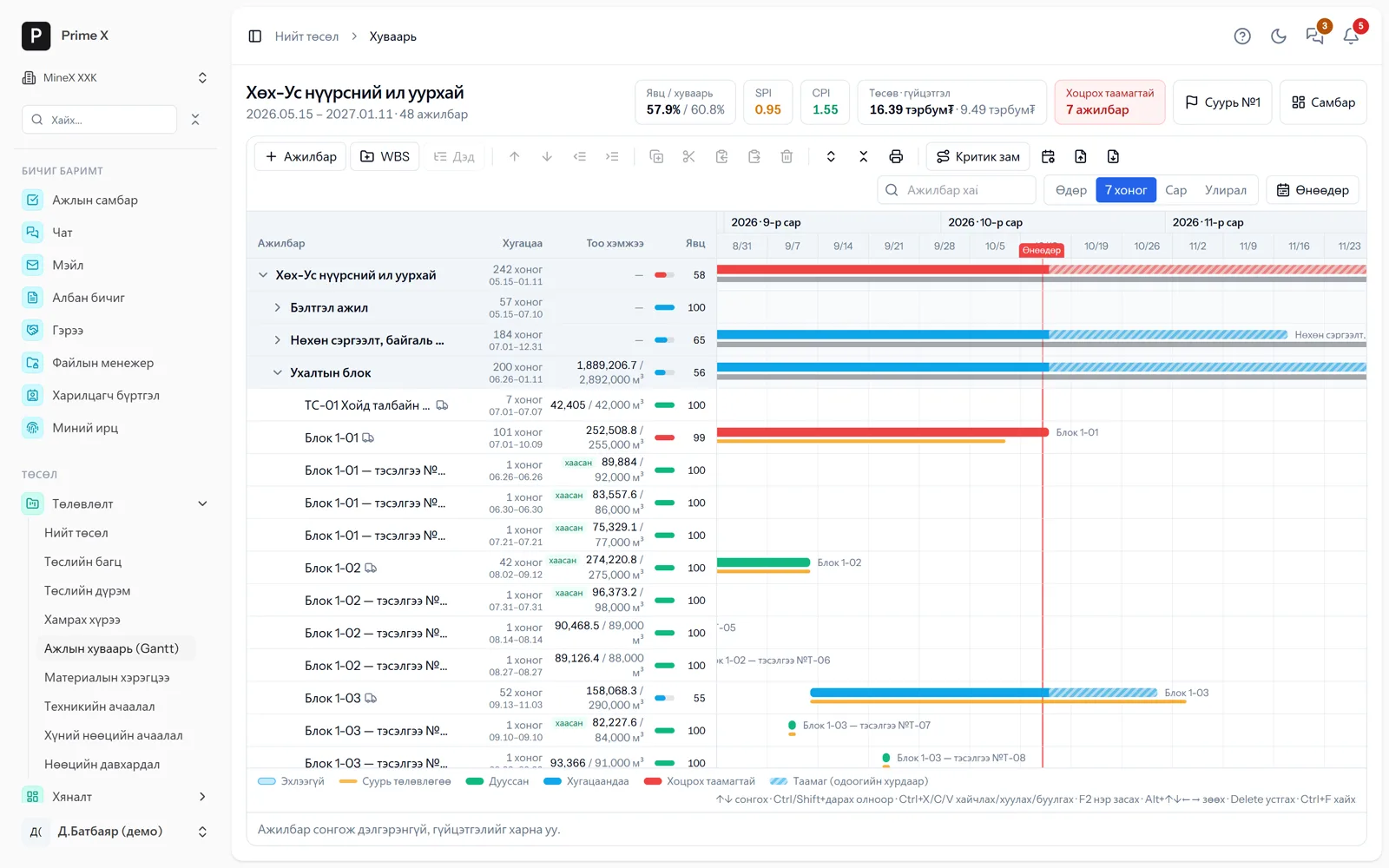
Project charter, WBS, baseline, EVM, risks, Monte Carlo, reserves, quality, status reports — with performance from field records.

When a project is created the budget is calculated from activities and accounts open automatically. Dependencies, critical path, work calendars and baselines on the Gantt schedule; every activity links to blocks, blasting, daily plans and work records, so performance comes in automatically. EVM (CPI/SPI, EAC, TCPI); the baseline changes only through a change request. Risk register (EMV), Monte Carlo (P50/P80), contingency and management reserves, quality checks, NCRs and status reports automatically. Equipment and labour loading like P6 Resource Usage, resource levelling. Primavera P6 (XER/XML) and MS Project import-export. Multi-year work in a project portfolio.

  • Project charter, RACI, WBS dictionary, acceptance criteria
  • Gantt — dependencies, critical path, baseline, P6/MS Project import-export
  • EVM (CPI/SPI, EAC), change requests, status reports
  • Risks, Monte Carlo (P50/P80), budget reserves, quality/NCR
  • Equipment and labour loading, resource levelling, project portfolio
  • Contracts, rates, completion acts, contractor rating
Details and more screens →
PrimeX · Work schedule (Gantt) — baseline, critical path
Work schedule (Gantt) — baseline, critical path
Demo company screen · sample data

Operations

Mine, road — dispatcher, GPS, geofences

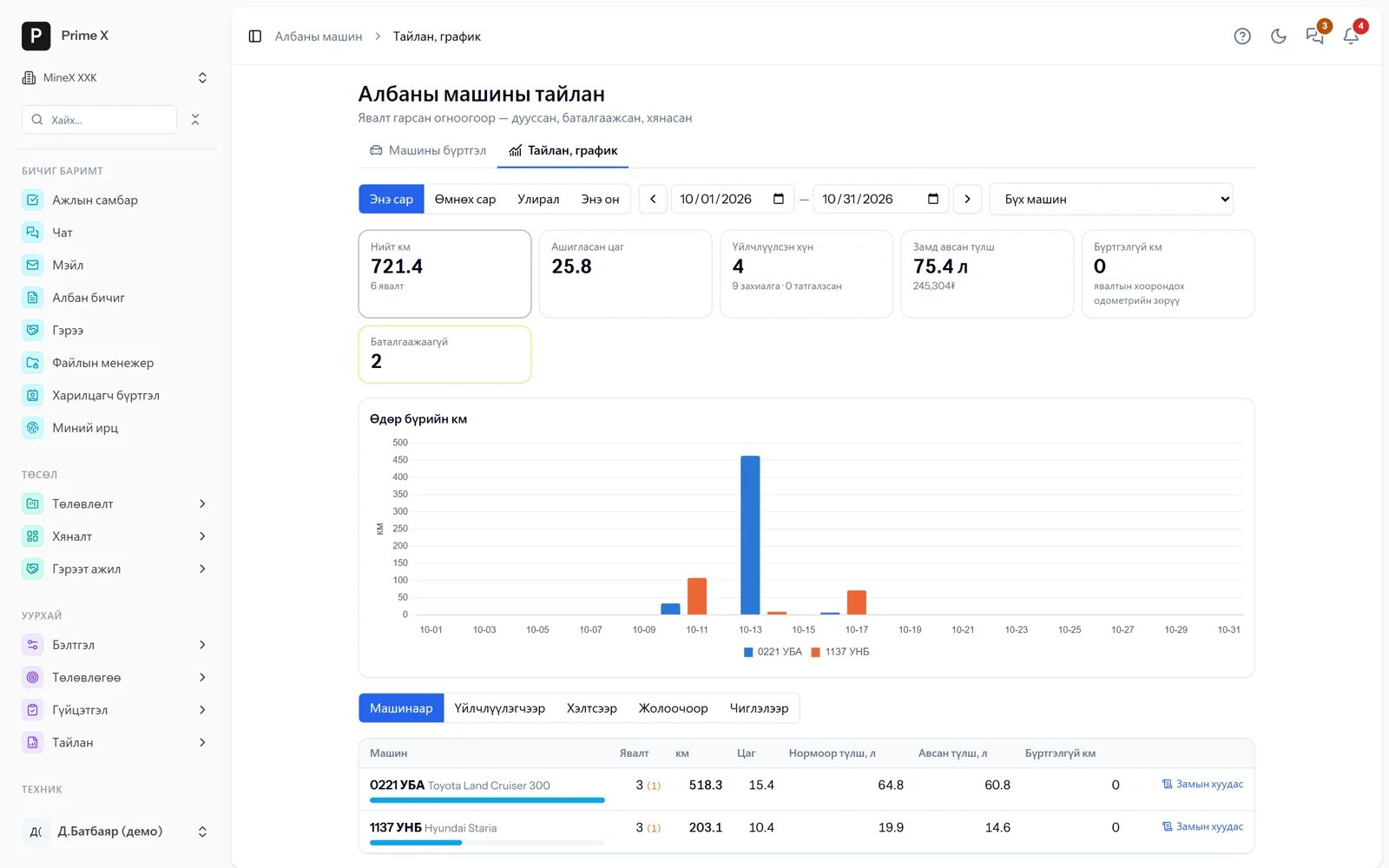
Every field record from the roster to the trip report in one flow; trips automatic from a GPS tracker or the driver’s phone.

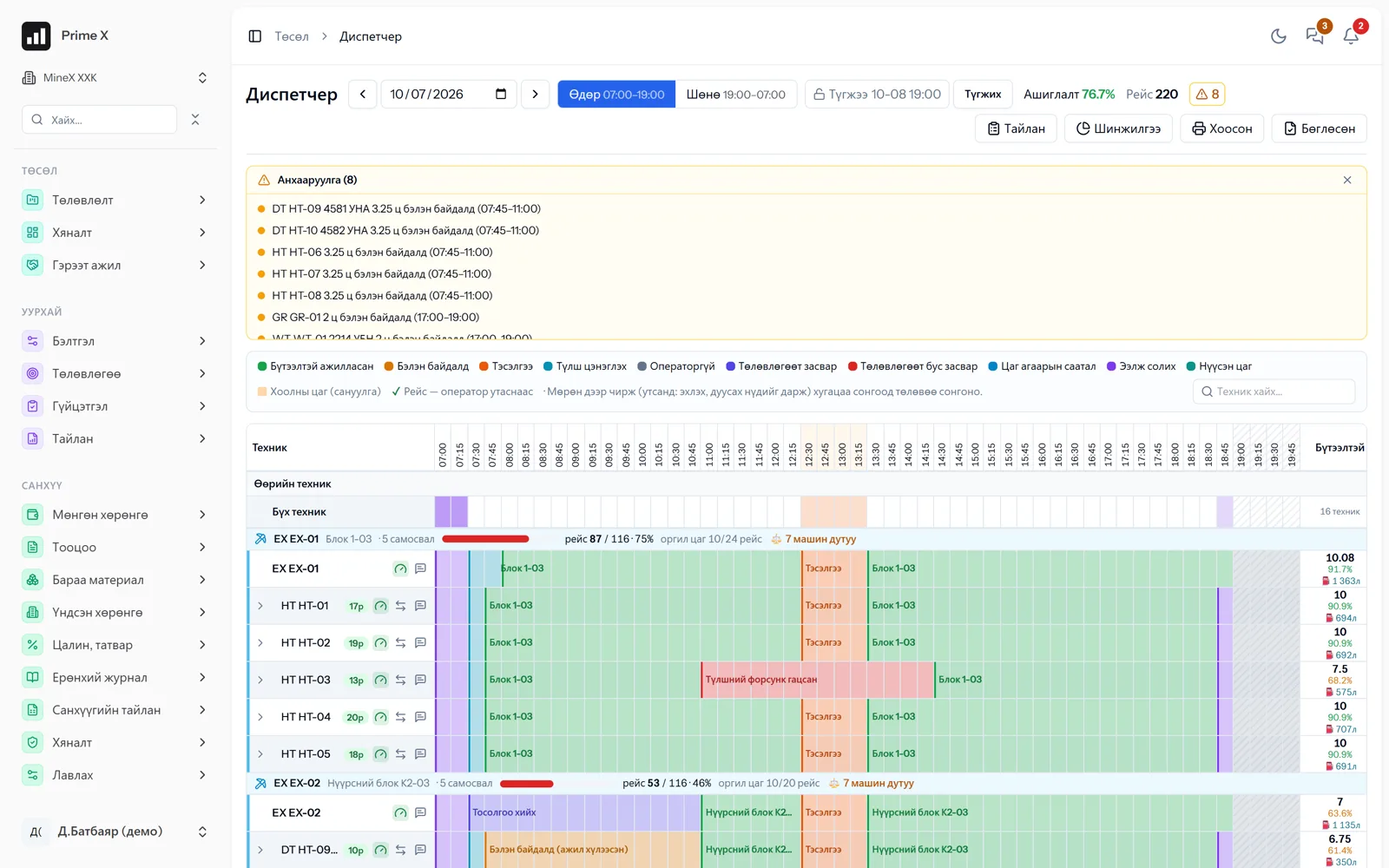
Shifts, crews, project equipment and rental drivers are set up on the roster. The dispatcher drags each machine’s status on one table that matches the paper waybill 1:1, and trips, location and time usage are recorded automatically. GPS telemetry (Traccar), geofences, live location, GPS trips, live dispatch (stages, matching, alerts, reassignment advice), weighbridge, the TUM time-usage standard. Cab: the driver picks the machine on the phone and records status and trips, and the phone becomes the tracker — the Android app sends even with the screen off and stores data offline. Survey measurements are imported for stockpile, quality and layer reports.

  • Roster (14/14, 21/7), crews, project equipment
  • Monthly and daily plans, blocks and blasting, drilling
  • Dispatcher — waybill 1:1; live dispatch in real time
  • GPS tracker, live location, geofences, GPS trips, weighbridge
  • Cab — the driver’s phone: status, trips, GPS, offline; Android app
  • Trips, fuel, time usage (TUM), survey, stockpiles, quality
Details and more screens →
PrimeX · Dispatcher
Dispatcher
Demo company screen · sample data

Finance

Accounting with a general ledger

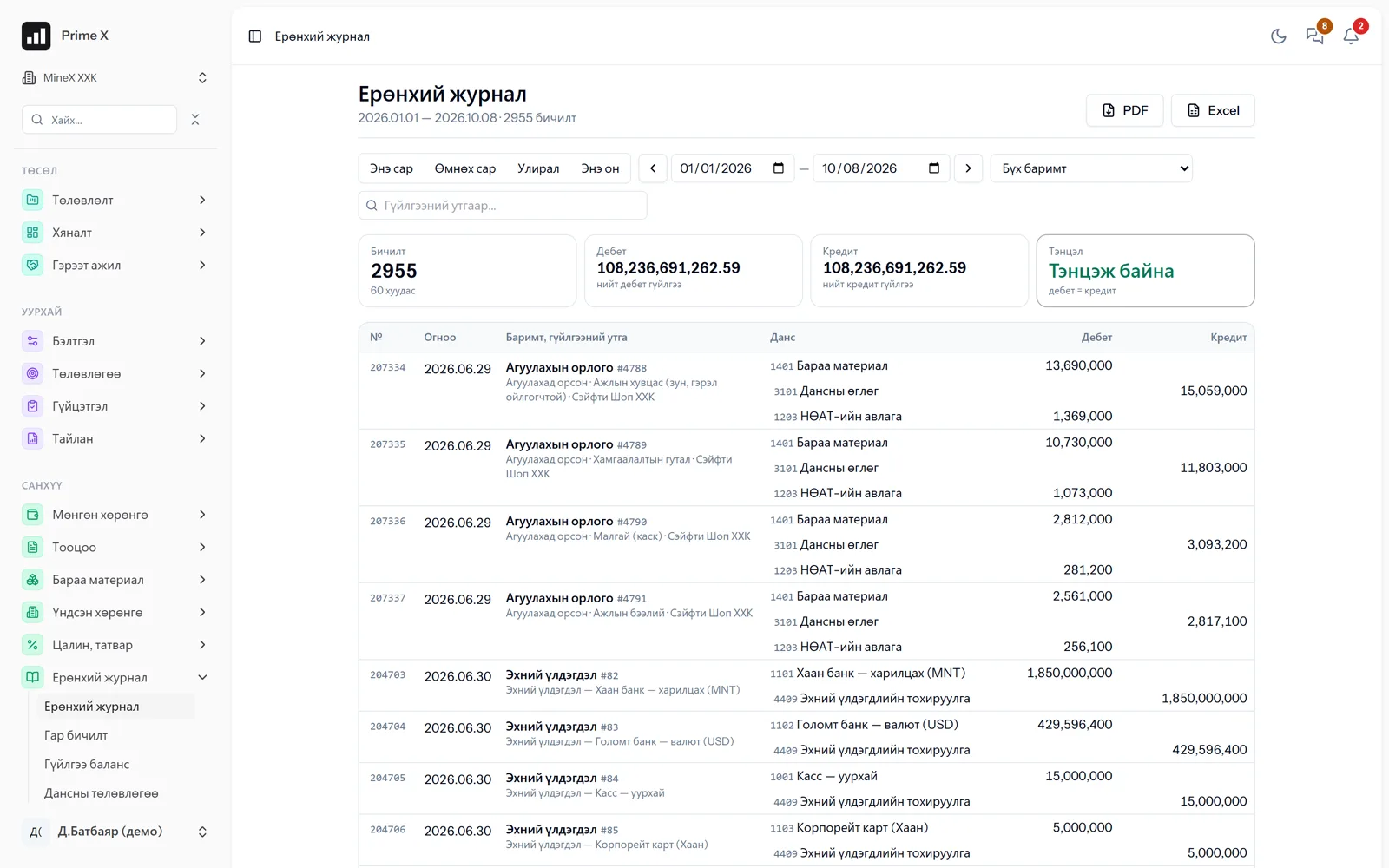
Cash, bank, receivables, inventory, fixed assets, payroll — all posted to the ledger automatically.

Every transaction from the operational modules is recorded in the general ledger as a double entry. Bank statements are imported and matched cash to cash. Inventory is valued by FIFO, fixed-asset depreciation and VAT are calculated automatically. Adjusting entries only by authorised people, every change with a history. Financial statements come out in the Ministry of Finance formats.

  • General ledger, chart of accounts, trial balance
  • Cash desk, bank statement reconciliation, exchange rates
  • Receivables, loans, counterparties
  • Inventory — FIFO valuation, acts, opening balances
  • Fixed-asset depreciation, VAT, payroll
  • Financial statements (Ministry of Finance formats), period closing
  • Adjustment rights, change history
Details and more screens →
PrimeX · General ledger
General ledger
Demo company screen · sample data

Procurement

Request → issue / purchase → reconcile

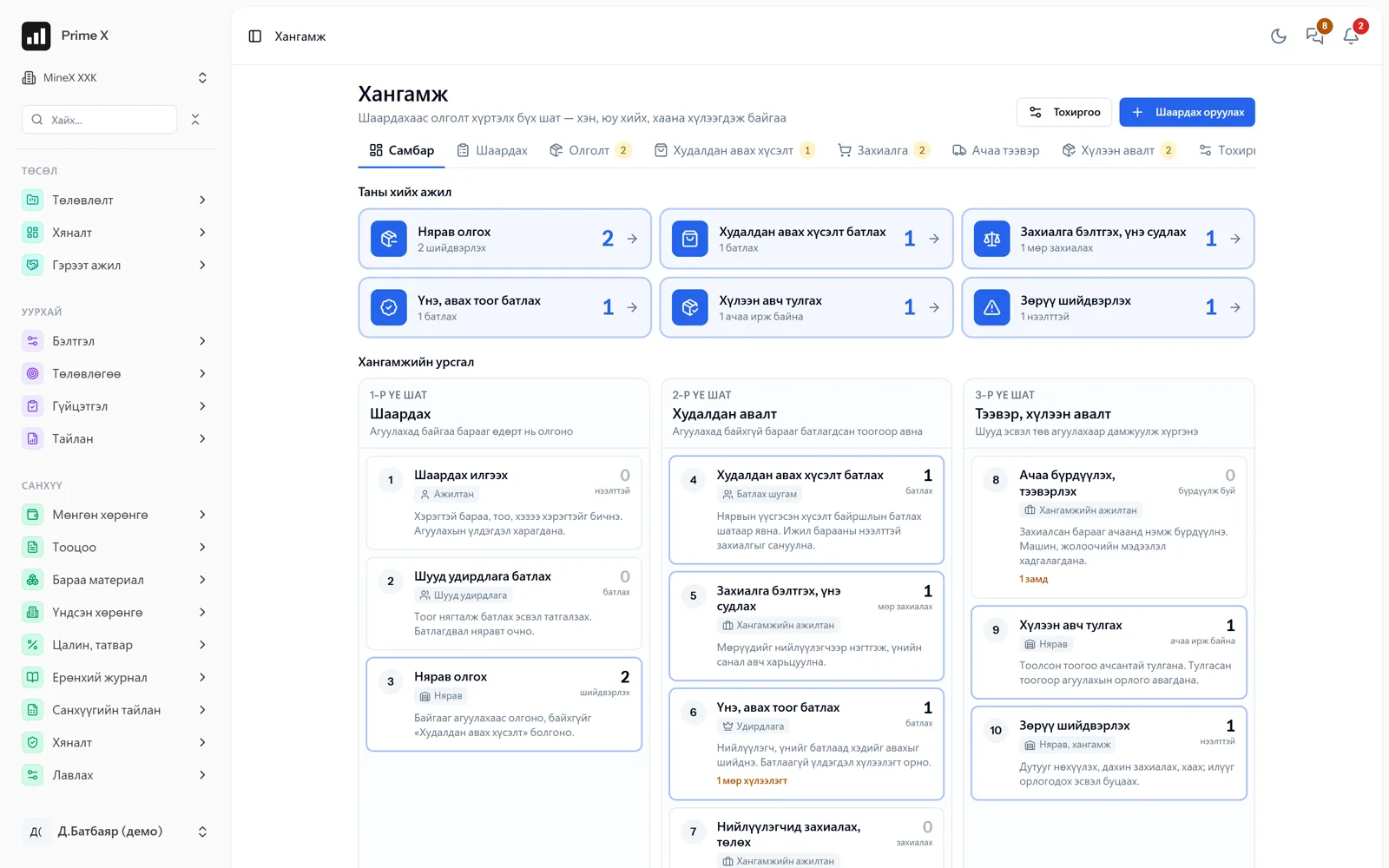
The employee requests, management approves, the storekeeper issues or raises a purchase; quotations, orders, freight, receiving and reconciliation.

Entering a request is open to every employee. Approval stages and members are set per location. The storekeeper issues from warehouse stock; if it is short, it becomes a purchase request and goes into an order. The order compares 3 suppliers’ quotations and management approves price and quantity. Freight with truck and driver; on receipt the counted quantity is reconciled with the order and shortages or damage are recorded as discrepancies. Income into the warehouse in FIFO batches, supplier payable in the ledger. On the board everyone sees “Your work”.

  • Request — every employee, from the phone
  • Approval stages per location
  • Issue from warehouse stock / purchase request
  • Order — 3 suppliers’ quotations, management approval
  • Freight, receiving and reconciliation, discrepancies
  • Board: “Your work”, flow stages, log
Details and more screens →
PrimeX · Procurement board
Procurement board
Demo company screen · sample data

HSE

ISO 45001 — PDCA cycle, management system

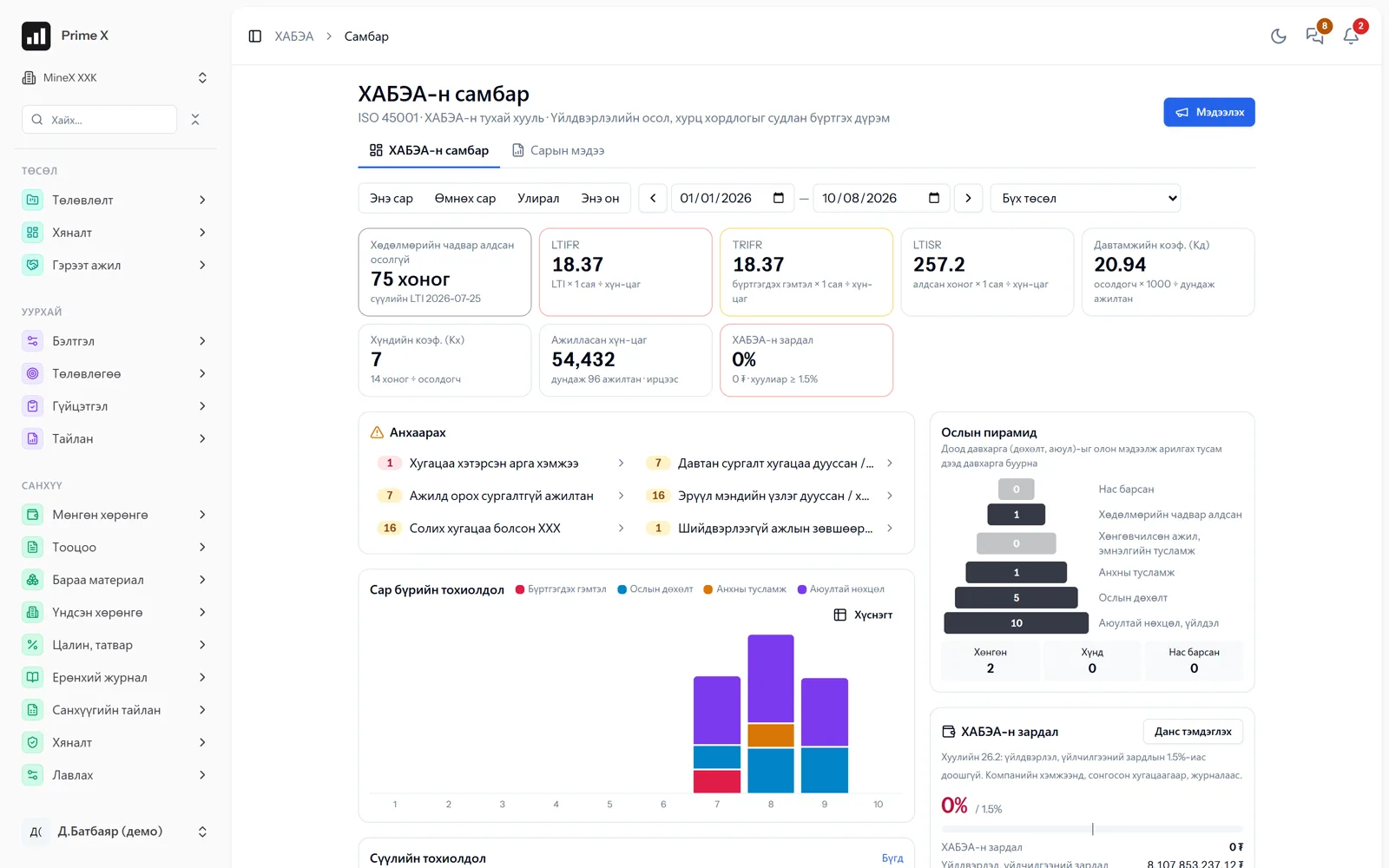
Risk assessment, inspections, work permits, training, PPE, health, incidents, actions, dashboard, monthly report. Management system: policy, objectives, legislation, MOC, emergencies, contractors, audit, review — compliance board.

Every employee reports hazards and near misses by phone, confirms training and PPE received and requests work permits. The HSE engineer rates risk by probability × consequence, sets the hierarchy of controls and inspects every week. Incidents are investigated under Government Rule 2015/269 and closed with an act and actions. PPE issue is tied to warehouse issues; training and medical check expiry is flagged in advance. Dashboard: incident pyramid, man-hours, LTIFR, spending. Monthly report in the inspection authority’s format.

  • Risk assessment, hierarchy of controls
  • Inspections, work permits (hot work, height, electrical)
  • Incidents, near misses — investigation, act, actions
  • Training, PPE (with warehouse), medical checks
  • ISO 45001 compliance board, policy, objectives, legislation, MOC
  • Internal audit, management review; work queue
Details and more screens →
PrimeX · HSE dashboard
HSE dashboard
Demo company screen · sample data

Environment

ISO 14001, monitoring, rehabilitation

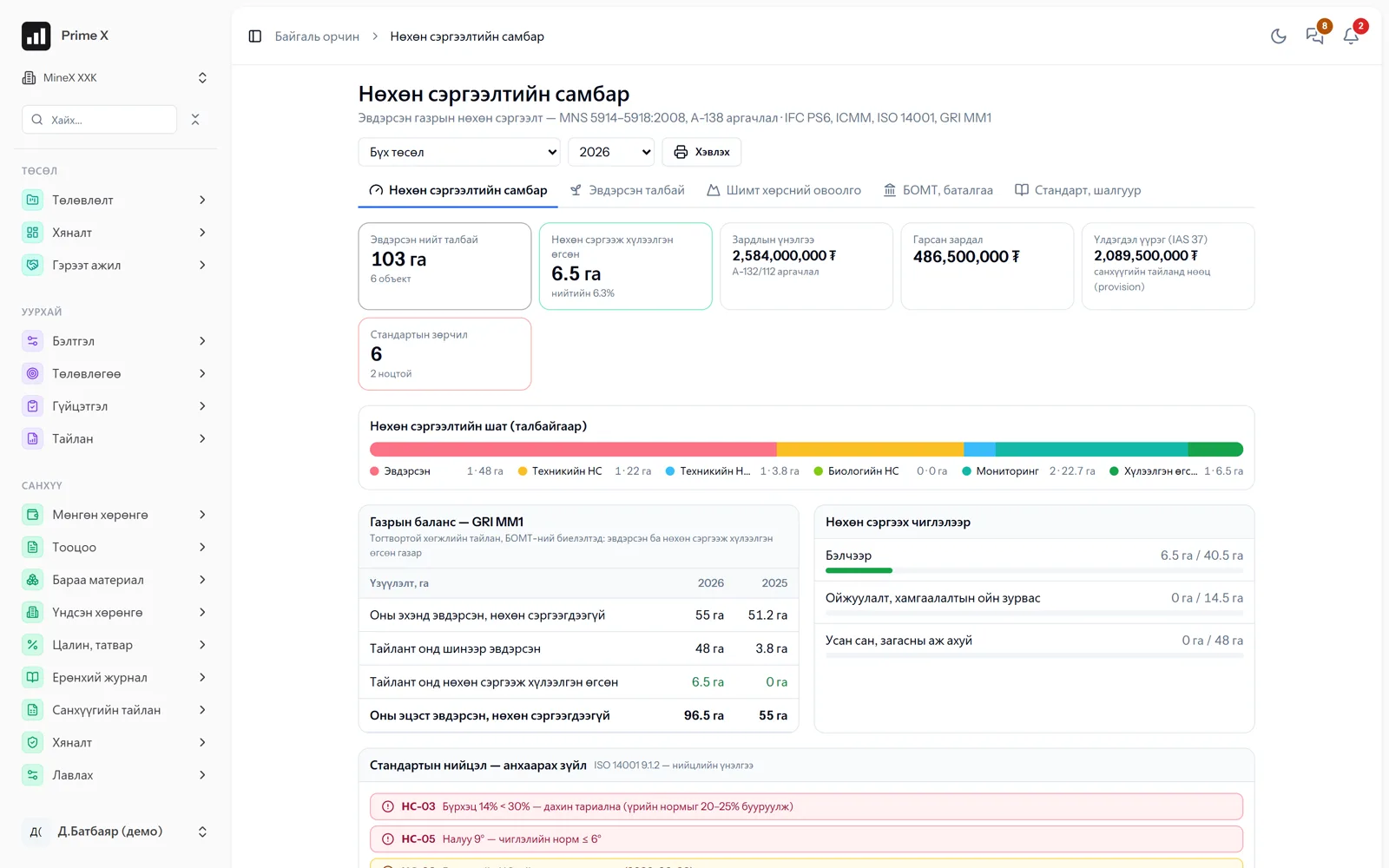
ISO 14001 system, air-water-soil monitoring against MNS standards, water, waste, complaints; every disturbed area tracked through each rehabilitation stage with the standard’s criteria.

Disturbed areas are recorded by the MNS 5915 class, and choosing the A-138 direction sets the slope, topsoil thickness and cover criteria automatically. Topsoil stockpiles are controlled under MNS 5916. Technical rehabilitation is accepted by a commission, and after biological rehabilitation every monitoring measurement is compared with the criteria. The dashboard shows the GRI MM1 land balance, the ISO 14001 compliance evaluation, the environmental management plan and the special-account guarantee.

  • Work guide — today’s, monthly and yearly cycle automatically
  • Monitoring — points, samples, MNS standard, exceedance → incident
  • Water use (GRI 303), waste (GRI 306), complaints
  • Policy, aspects and impacts, legislation, emergencies, audit
  • Disturbed area → technical → biological rehabilitation → monitoring → handover
  • GRI MM1 land balance, ISO 14001 compliance, environmental plan
Details and more screens →
PrimeX · Rehabilitation dashboard
Rehabilitation dashboard
Demo company screen · sample data

Work norms

Norms, daily records, productivity — even without a project

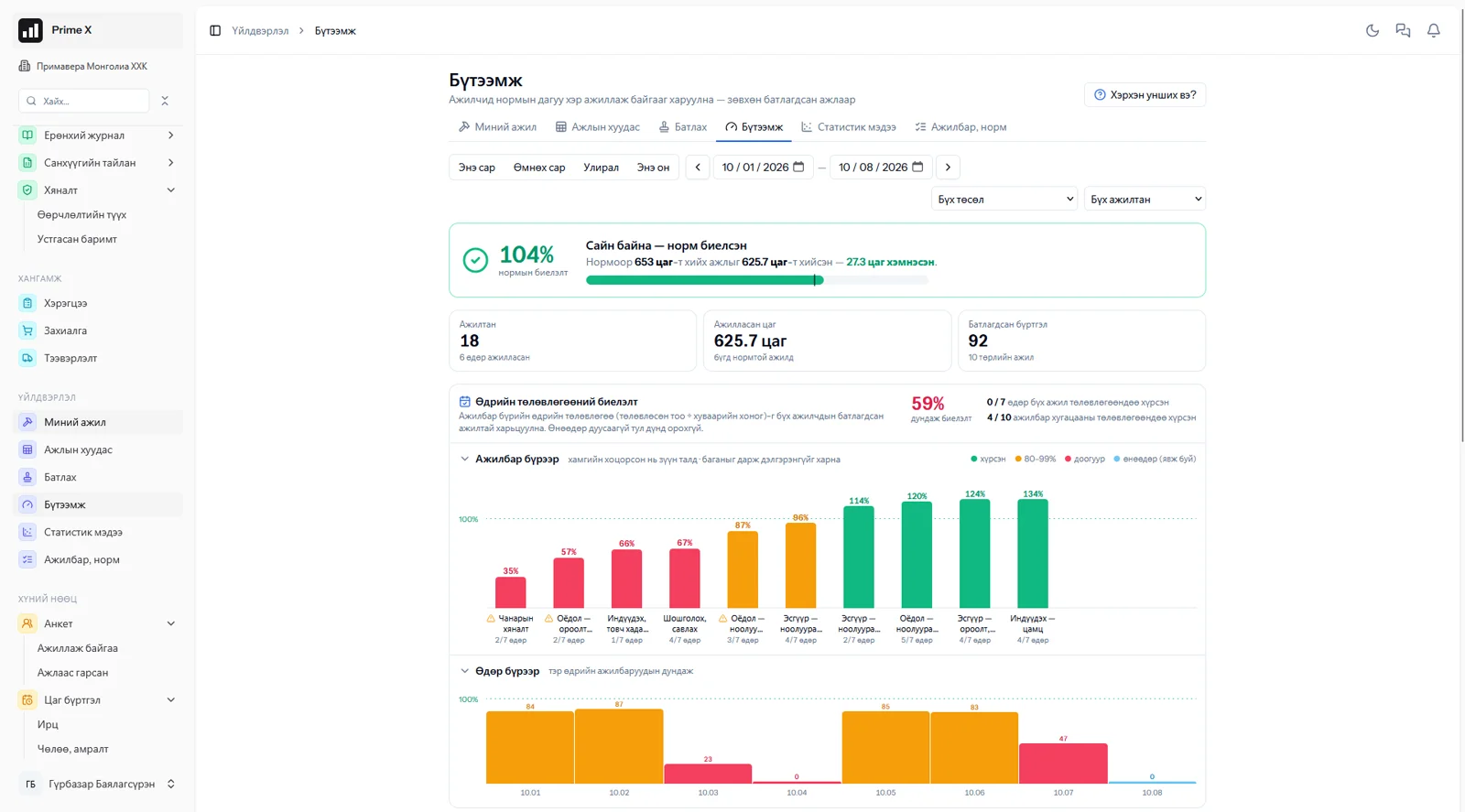
Set a norm for every job, record daily work with attendance, and once approved it goes into performance, productivity and payroll. “Routine work” — no project or schedule, repeats every month: clinics, workshops, sewing, services.

Each project defines activities and norms (quantity and hours). The employee records the day’s work from “My work”, or the foreman for the team on the “Work sheet”; nothing can be recorded for someone without attendance. When the manager approves grouped by employee, day and activity, the quantity goes into project progress and productivity shows as a percentage of the norm. The statistics report compares attendance and performance with target levels. Two pay forms: pure piecework, or base salary plus a tiered bonus. The sheet goes to payroll, payroll to the general ledger.

  • Activities, norms, daily plan
  • My work / Work sheet (foreman)
  • No attendance, no record
  • Approve — grouped, adjusting quantities
  • Productivity by employee and activity
  • Statistics: attendance × performance, target levels
  • Pay sheet → payroll → ledger
Details and more screens →
PrimeX · Productivity
Productivity
Demo company screen · sample data

Company cars

Bookings, odometer, signature, waybill

The employee books a car, the coordinator assigns and approves, the driver records the odometer, the passenger confirms with a signature; waybill and reports automatically.

A company car is a machine in the equipment register — usage here, repairs in the equipment module. The booking has route points, purpose and passengers; the coordinator checks overlap, seats and repairs and assigns a car and driver. Departure / return odometer, fuel; the passenger signs on the phone and explains any discrepancy; the coordinator reviews and locks. The odometer goes into the machine’s counter and the km-based service plan runs. A4 waybill, unrecorded km; reports by car, passenger, department, driver, route. Flutter mobile app.

  • Booking — route, purpose, passengers; with a driver / self-driven
  • Assign — checks overlap, seats, repairs
  • Departure / return odometer, fuel; km automatic
  • Passenger signature on the phone; discrepancies
  • A4 waybill; unrecorded km
  • Reports, charts; Android and iOS app
Details and more screens →
PrimeX · Company car report
Company car report
Demo company screen · sample data

Equipment

Repair, maintenance

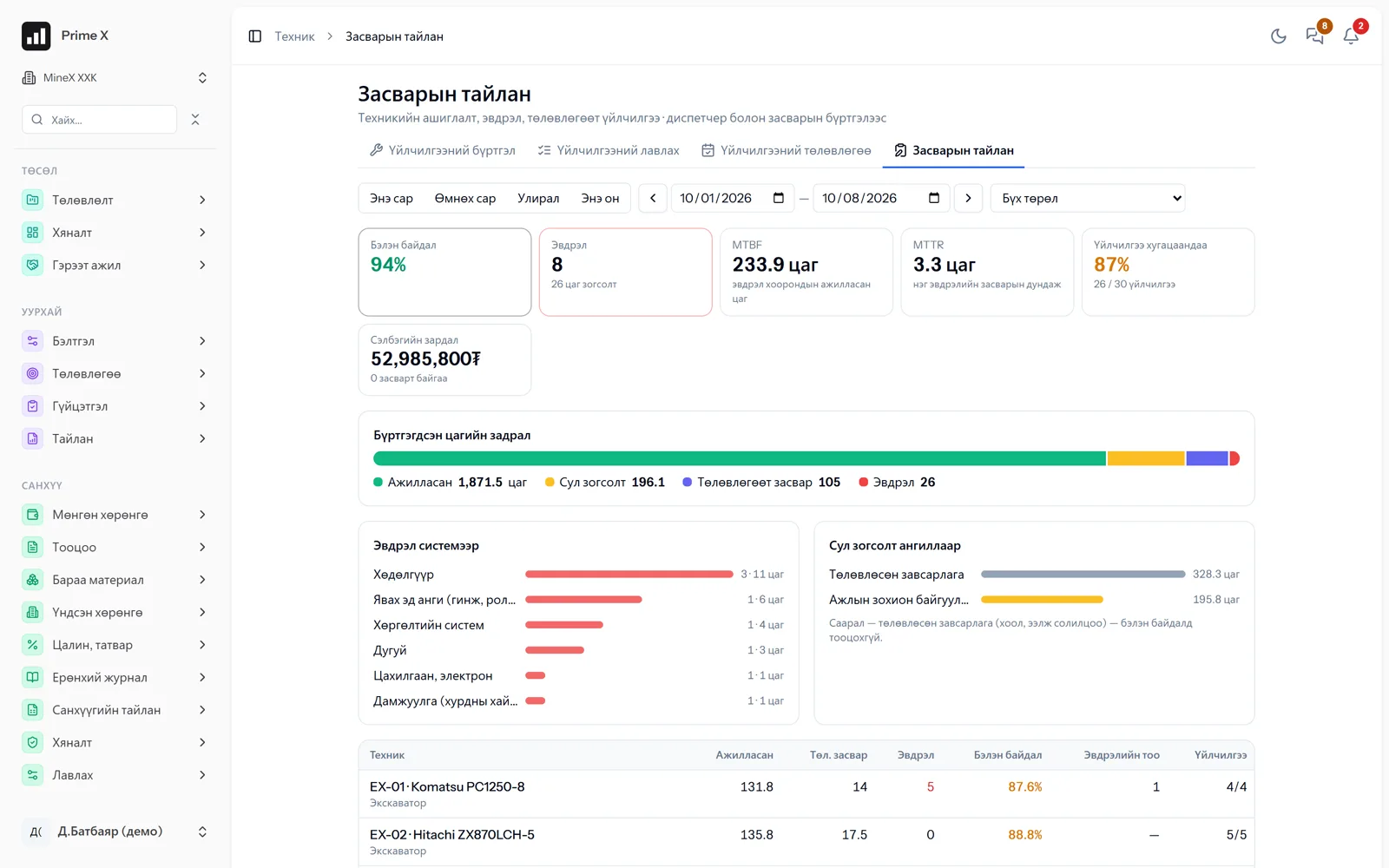
Engine hours, service plans and repair history for every machine.

Engine hours accumulate automatically from dispatcher records and reminders come according to the service plan. Service templates create a schedule for every machine type. Repair requests have an approve, consume parts, close flow. Failure causes, downtime and costs are recorded to compare every machine’s reliability. For rented machines the rental settlement is created automatically and printed for the lessor.

  • Full equipment register, engine hours, plate-number history
  • Service plans, templates, reminders
  • Repair requests — approval, parts, closure
  • Certificates, insurance — expiry reminders; photos
  • Super report, quotations (PDF, Excel); statistics
  • Rental settlement — the lessor approves daily in the portal
Details and more screens →
PrimeX · Repair report
Repair report
Demo company screen · sample data

Rental marketplace

Rent and lease equipment — free portal

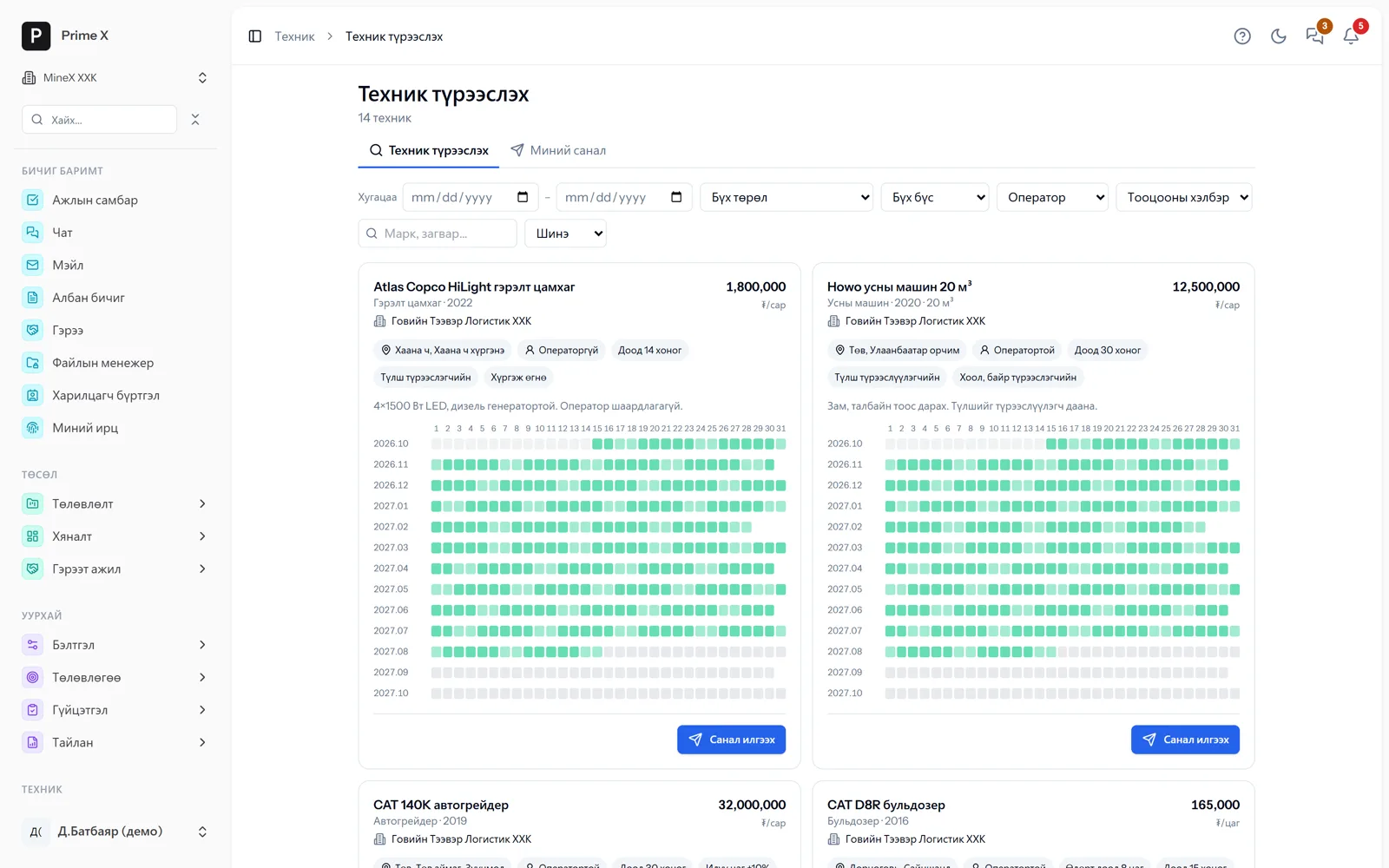
The lessor lists equipment, the mine searches for idle equipment and sends an offer; on agreement the contract, register and daily settlement are automatic.

Rental companies and individuals register on PrimeX for free and list their equipment: price (hour / month / trip), terms (operator, fuel, board and lodging), region, busy dates on the calendar. Mines and road companies filter by period, type and region, see the calculated total and send an offer; several companies compete for one machine at once, and the lessor chooses or counter-offers. On agreement the counterparty, equipment record and rental contract are created automatically and daily settlements are calculated from waybills — the lessor approves or disputes in the portal; when both sides approve the monthly act, payable and receivable go into the ledger. Handover acts, breakdowns and delays, extensions, mutual rating.

  • List equipment — price, terms, region, calendar
  • Search, send offers — several companies compete
  • On agreement: contract, register and project resource automatically
  • Daily settlement — the lessor approves / disputes
  • Monthly act → payable and receivable in the ledger
  • Handover acts, breakdowns and delays, rating; the portal is free
Details and more screens →
PrimeX · Rent equipment
Rent equipment
Demo company screen · sample data

Human resources

Profiles, attendance, payroll

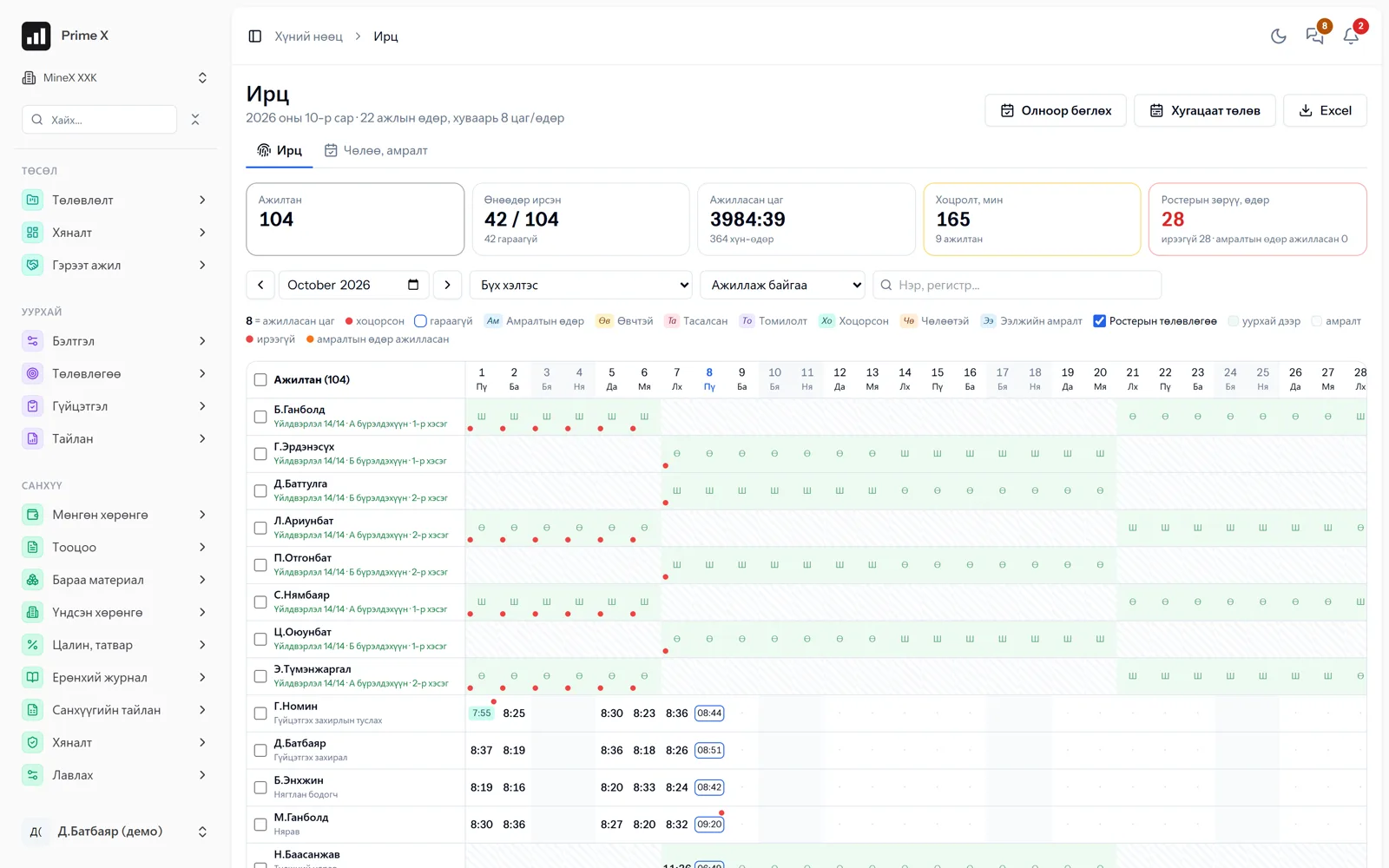
Employee profiles, orders, GPS attendance, leave and payroll sheets in one place.

Employee profiles are separate per company; personal data is shared by consent. Hiring and release orders change the status automatically and length of service is calculated. Employees record attendance by phone and the location is marked by GPS — no devices to install. Leave, holidays, public holidays and working hours link to the payroll sheet.

  • Profile — employee status by order
  • Structure, positions, employment contracts
  • GPS attendance from the phone (check-in / check-out)
  • Leave, holidays, public holidays, working hours
  • Payroll sheet
Details and more screens →
PrimeX · Time records
Time records
Demo company screen · sample data

Documents

Correspondence, contracts, files, collaboration

Incoming and outgoing letters, orders, contracts (payment schedules, obligations, reminders), file manager, counterparties, collaboration board, mail, help.

Correspondence flow, orders and meeting minutes in one place. Every contract has a payment schedule (one-off / recurring) that feeds cash requirements, obligations and key dates, auto-renewal, 30/7/1-day reminders, and payments reconciled with finance transactions. A file manager like OneDrive: versions, sharing, external links (expiry, password), documents with validity dates, AES-256. Assign tasks on the collaboration board and track progress and KPIs. Gmail connection, attachments viewed in the app. Help guide in 5 languages inside the app.

  • Incoming and outgoing letters, orders
  • Contracts — payment schedule, obligations, auto-renewal, reminders, reconciliation
  • File manager — versions, sharing, external links, AES-256
  • Collaboration board, KPI, tasks with chat
  • Mail (Gmail connection), meetings
  • Help “?” — in 5 languages
Details and more screens →
PrimeX · Incoming letters
Incoming letters
Demo company screen · sample data

Admin

Permissions, settings

Company start-up steps, access levels, Telegram notifications.

The step-by-step “Company start-up” guides a new company through the chart of accounts, projects, equipment, employees and opening balances in order. Each role gets only the menus and actions it needs. A person working in several companies switches with one login. Notifications of important events arrive by Telegram.

  • Step-by-step company start-up
  • Access levels (roles)
  • One login for several companies
  • Telegram notifications
  • Change history, backups
PrimeX · Structure, positions
Structure, positions
Demo company screen · sample data

Pick what you need

Take only the modules you need — example bundles

Every module works on its own. Choose a starting bundle and add the rest as the need arises — no reconfiguring.

HSE only

Mines, construction, factories — the HSE department

2 modules
HSE Chat

Risks, inspections, permits, incidents, training, PPE, monthly report. Every employee by phone.

Office

Any organisation

5 modules
Documents Chat Human resources Company cars Prime AI

Correspondence, orders, contracts, collaboration board, chat, profiles, GPS attendance, company cars, Prime AI.

Factories, clinics, services

Sewing, assembly, workshops, clinics

4 modules
Work norms Human resources Finance Procurement

Norms, daily records (“Routine work” — no project), productivity, pay, payroll, warehouse — without the mining modules.

Procurement & warehouse

Companies with purchasing and a warehouse

2 modules
Procurement Finance

Requests, approval, quotations, orders, freight, receiving and reconciliation, FIFO.

Projects and contractors

Infrastructure, construction, roads

4 modules
Projects Operations Equipment Finance

Gantt, EVM, contracts, acts, trips, equipment — one set of numbers with the contractor.

Lessors — free

Companies and individuals that rent out equipment

2 modules
Rental marketplace Chat

List your equipment, choose among offers, approve daily settlements from your phone. No module required.

The whole mine

Mining companies

11 modules
Prime AI Projects Operations Equipment HSE Environment Procurement Human resources Finance Documents Chat

Every section on one set of data. Investors see it in their own language.

Example bundles. Any module on its own, in any combination — we define it together at the walkthrough.

Better in real life

Screenshots show only a small part of the system

A screenshot shows just one moment. On the real system, when the dispatcher changes a status you see the trip report change, the act appear and the ledger entry go in. The best way is 30 minutes together on your company’s data.

  • With your equipment, employees and project names
  • Questions answered on the spot and shown on screen
  • Online or at your office
  • No obligation, no charge

See it on the real system

Request a walkthrough Try the dispatcher

There is no open demo. Walkthroughs are done only at your request, for your company.

Ready to run your company on one system?

Screenshots do not fully show how it works in practice. We give a 30-minute walkthrough on your company’s data and draw up an implementation plan together — office, factory, clinic, road or mine, the whole system or a single module. If you have foreign investors we show the English and Chinese interfaces too.